Docs / Kiai
Kiai - Alert Bridge
Route every alert your NinjaTrader tools raise to email, Telegram, Discord, ntfy, or your own webhook, with rules that decide what is worth interrupting you for.
Last updated 2026-08-25
Kiai (気合, the shout that focuses everything into one moment) is the alert hub. Every other TickSensei product publishes into it, and Kiai decides what gets delivered, where, and how often.
The value is not “notifications”. It is that the alert reaches you when you are not at the desk, and that the ones that do not matter never fire at all.
The two-minute setup
- Open Kiai from the NinjaTrader Control Center.
- Under ADD CHANNEL, choose type
emailand click Add channel. No configuration needed: it goes to your TickSensei account email. - Click Send test and confirm the mail arrives.
- Under ADD RULE, leave the defaults (all alerts, any product), tick your channel, and click Add rule.
You now get every alert from every product. Tighten it from there.
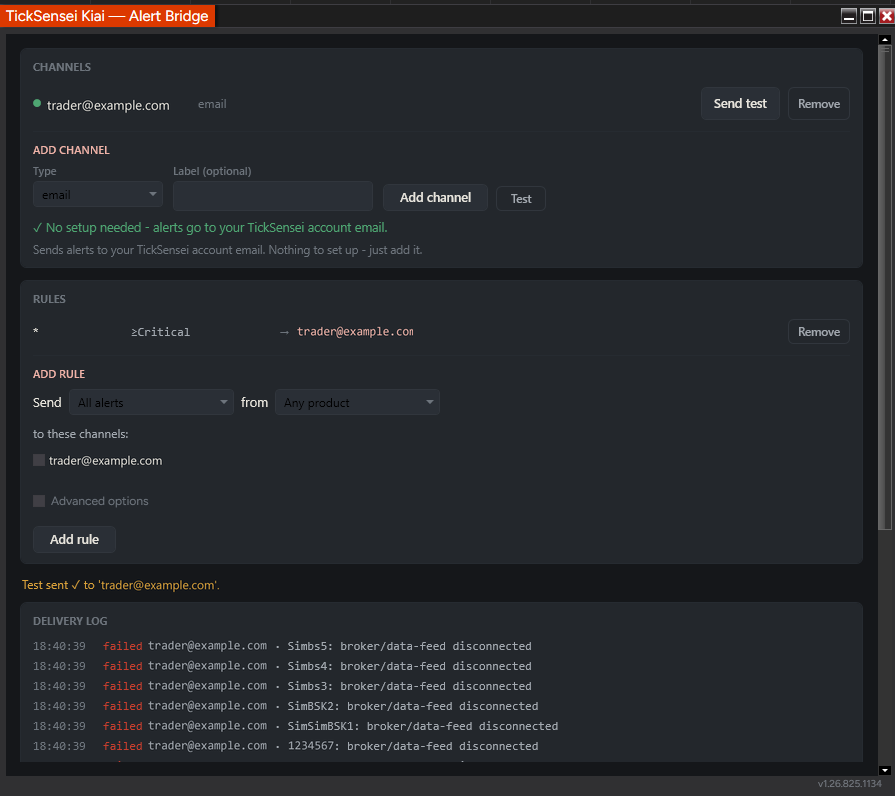 Kiai’s single window: channels at the top, rules in the middle, delivery log at the bottom.
Channels
A channel is a destination. Add as many as you like; each one has an optional label so you can tell two Discord webhooks apart.
| Type | Setup | Good for |
|---|---|---|
| None. Uses your TickSensei account email. | Getting started, and anything you want a written record of. | |
| telegram | Bot token plus chat id. | The best phone alerts: instant, free, and reliable. |
| discord | A channel webhook URL. | Trade rooms and your own logging channel. |
| ntfy | An ntfy topic URL. | Push to phone without running a bot. |
| webhook | Any URL that accepts a POST. | Wiring alerts into your own tooling. |
The form is type-aware: pick a type and it tells you exactly what that type needs (a token, a chat id, a URL, or nothing at all).
Always click Test before you rely on a channel. The test result appears in the status line under the rules, and the send shows up in the delivery log.
Channels hot-reload. Add, edit, or remove one and it takes effect immediately, with no NinjaTrader restart.
Setting up Telegram
- Message @BotFather on Telegram and send
/newbot. It gives you a bot token. - Send your new bot any message, so it is allowed to message you back.
- Get your chat id (message
@userinfobot, or openhttps://api.telegram.org/bot<TOKEN>/getUpdatesand read thechat.id). - In Kiai, add a
telegramchannel with the token and chat id, then click Test.
For a group, add the bot to the group and use the group’s chat id (it starts with a minus sign).
Setting up Discord
In Discord: Server Settings, then Integrations, then Webhooks, then New Webhook. Pick the channel, copy the webhook URL, paste it into Kiai as a discord channel, and test.
Rules
A rule answers: which alerts, from where, to which channels.
The ADD RULE form is deliberately plain: Send [All alerts / Warnings and above / Critical only] from [Any product / a specific product] to these channels: [tick the ones you want]. Tick Advanced options to reach the rest.
Rules that match are unioned, not first-match-wins. If two rules both match an alert, it goes to both sets of channels, once per channel.
The advanced gates
Each rule can carry:
- Minimum severity: Info, Warning, or Critical.
- Instrument filter: only alerts about a given instrument.
- Message regex: match on the alert text itself. This is the sharp tool.
drawdown|floorgets you every risk-limit alert and nothing else. - Dedupe window: suppress repeats of the same alert for N seconds. Essential, because a condition that stays true will keep re-raising.
- Daily cap: hard ceiling on how many times this rule can fire per day.
When a rule suppresses something, Kiai records why, so a missing alert is explainable rather than mysterious.
A rule set that works
Three rules, and you are done:
- Critical only, any product, to Telegram. Breaches, disconnects, naked positions. This is the one that interrupts you.
- All alerts, any product, to email, dedupe 300 seconds. The written record, without the phone buzzing.
- Warnings and above from Fudoshin, to Telegram, dedupe 600 seconds, daily cap 10. Early warning that you are approaching a limit, capped so a bad day does not spam you.
The delivery log
The bottom panel is a live, append-only log of every send attempt with its timestamp, channel, and outcome.
Read it when an alert did not arrive. failed next to a channel means the transport rejected the send: a bad token, a revoked Discord webhook, or an unreachable URL. sent means it left your machine.
Alerts are queued to disk before they are sent. If NinjaTrader closes mid-delivery, the queue survives and drains on the next launch. Transient failures are retried with backoff; permanent ones are dropped and reported in the log rather than retried forever.
Rate limits
Kiai enforces per-transport rate limits so you never get a destination throttled: Telegram 20 per minute per chat, Discord 30 per minute, webhook and ntfy 60 per minute. If you are hitting these, the fix is a dedupe window on the rule, not a higher limit.
What sends alerts into Kiai
- Fudoshin publishes warns, breaches, flattens, and lockouts.
- Ukemi publishes disconnects, data stalls, naked positions, and limit-proximity warnings.
- Honbu publishes kill-switch and flatten-all events.
- Your own strategies and indicators, via the drop-in
BridgeAlertindicator. Add it to a chart, set itsSourceLabel, and callSendAlert(message, severity)from your NinjaScript. That gives any strategy you have written phone alerts without touching its logic.
Troubleshooting
The test says sent but nothing arrived. For Telegram, you must message the bot first. For Discord, confirm the webhook still exists. For email, check spam.
Every log line says failed. Usually one broken channel repeated across many alerts, not many broken channels. Look at the channel name in the log line and re-test that one.
I am drowning in alerts. Raise the minimum severity on your phone rule and set a dedupe window. A condition that stays true re-raises every evaluation cycle, and the dedupe window is what turns that into one message.
An alert I expected never fired. Check that a rule actually matches it, then check whether a dedupe window or daily cap suppressed it.
Channel credentials. Tokens and webhook URLs are stored in Kiai’s config on your machine. Treat that file as a secret and do not share it or screenshot it.
Related
- Fudoshin - Risk Guardian: the loudest source of alerts worth having
- Ukemi - Strategy Safety Net: the alerts that matter most when you are away from the desk
Estimates and tooling only. Your prop firm's published rules are always authoritative, and nothing here is financial advice. Questions? support@ticksensei.com