Docs / Hansei
Hansei - The Enforced Trading Journal
A trading journal you actually keep, because it is enforced: a pre-market readiness gate that can block entries until you have checked in, auto-captured and auto-tagged trades, and a discipline calendar that scores the ritual. Local tier free; Hansei Cloud adds sync, a durable encrypted archive, the Dojo web calendar, and Sensei's journal review - free with any Sensei belt.
Last updated 2026-10-13
Hansei (反省, “self-reflection”) is the journal you actually keep - because it does not wait for your goodwill. Most journals fail the same way: they are a separate app you are supposed to fill in after a bad session, which is exactly when you least want to. Hansei lives inside NinjaTrader, captures the trades for you, and can gate your first entry of the day on a pre-market check-in you set for yourself.
Everything in the free tier is local: it runs in NinjaTrader with no license and nothing leaves your machine. Hansei Cloud adds sync, a durable archive, the web calendar, and Sensei’s coaching - and is included free with any belt that bundles Sensei.
Hansei has four tabs. Today is the pre-market readiness gate. Journal is your day-by-day book of pre- and post-market entries with Sensei’s review. Review is the after-session recap of what you actually traded. Fine-tune holds capture, enforcement, and the checklist editor.
The one-minute setup
- Open Hansei from the NinjaTrader Control Center. It opens on the Today tab.
- On Fine-tune → Edit checklist, build your pre-market checklist - add items from the library or write your own.
- Decide how strict to be under Enforcement & lockout: off (journal only), block entries until the checklist is cleared, or block when your readiness score is too low.
- Trade. Hansei captures every fill automatically; after the close, write your post-market reflection on the Journal tab.
That is the whole product. Everything below is detail.
Today: the readiness gate
The Today tab is your pre-market check-in. The idea is sequencing: decide, while you are calm before the open, what you must do before you are allowed to trade - then let the tool hold you to it.
- You work through your PRE-MARKET READINESS checklist. Each item you complete raises today’s readiness score.
- Answers can be locked in. As the tab says, “Locking in fixes today’s decision - it can’t be softened by re-answering later.” You cannot talk yourself out of an honest morning answer at 2pm.
- The check-in is scoped to the session and clears at the day boundary, so each trading day starts fresh.
How hard the gate pushes is up to you (set on Fine-tune, below): it can do nothing at all, block your entries until the checklist is cleared, or flag the day low-readiness and optionally make it a no-trade day when your score is at or below a threshold. Entry blocking only ever stops new exposure - exits, reductions, and protective stops are always allowed, so the gate can never trap you in a position.
Journal: your day-by-day book
The Journal tab is the record, one day at a time, filterable by account and instrument.
- Each day carries your Pre-market check-in and your Post-market reflection, alongside the day’s trades, P&L, and any rule broken flags.
- Trades are auto-written from NinjaTrader - you do not type them in.
- Discipline analytics connect the ritual to the outcome: whether doing the pre-market work actually changed how your sessions went.
- With Hansei Cloud, Sensei reviews the day (“Sensei · journal review”) - reading your real entries and tags and writing back a coached read. There is a prompt to “open your journal in the Dojo for the full experience” - the web calendar view.
Review: the after-session recap
The Review tab is the end-of-day recap: TODAY’S RESULT, the TRADES captured (with MAE so you can see how far each went against you), your POST-MARKET note, and, on Cloud, SENSEI’S READ. A simulator toggle (Incl. sim) lets you include or exclude demo accounts, so a sim session does not distort the picture.
Fine-tune: capture, enforcement, and the checklist
The Fine-tune tab is everything behind the other three, with an In plain terms line that states exactly what Hansei will do.
Capture & account
- Account email ties the journal to your Dojo account for cloud sync.
- Include simulator accounts decides whether sim trades are captured and journaled.
- Copy tags across copy-traded accounts applies the same leak tags to accounts you copy-trade, so you tag once.
Enforcement & lockout
- Block entries until cleared - the readiness gate; no new entries until the checklist is done.
- Block below a threshold - set a readiness-score floor; below it, the day is flagged low-readiness and can be made a no-trade day.
- As with Fudoshin, blocking only touches new risk - you can always get flat.
Edit checklist
- Build your pre-market checklist from the library or add a custom item; also save to my library keeps a custom item for reuse.
- Each item can count toward the readiness score - or be marked as a note that does not (and is not a leak tag).
Local vs Cloud
| Local (free) | Hansei Cloud ($19/mo) | |
|---|---|---|
| Pre-market readiness gate | ✓ | ✓ |
| Auto-captured, auto-tagged trades | ✓ | ✓ |
| Discipline calendar / analytics | ✓ | ✓ |
| Entry blocking + no-trade-day enforcement | ✓ | ✓ |
| Cloud sync + durable encrypted archive | — | ✓ |
| Cross-device + web journal calendar (Dojo) | — | ✓ |
| Sensei’s journal review | — | ✓ |
Hansei Cloud is included free with any belt that bundles Sensei - Blue, Brown, and Black. The belt activates it automatically; you do not buy Hansei separately. (The White belt has no Sensei, so no Hansei Cloud.)
Hansei Cloud
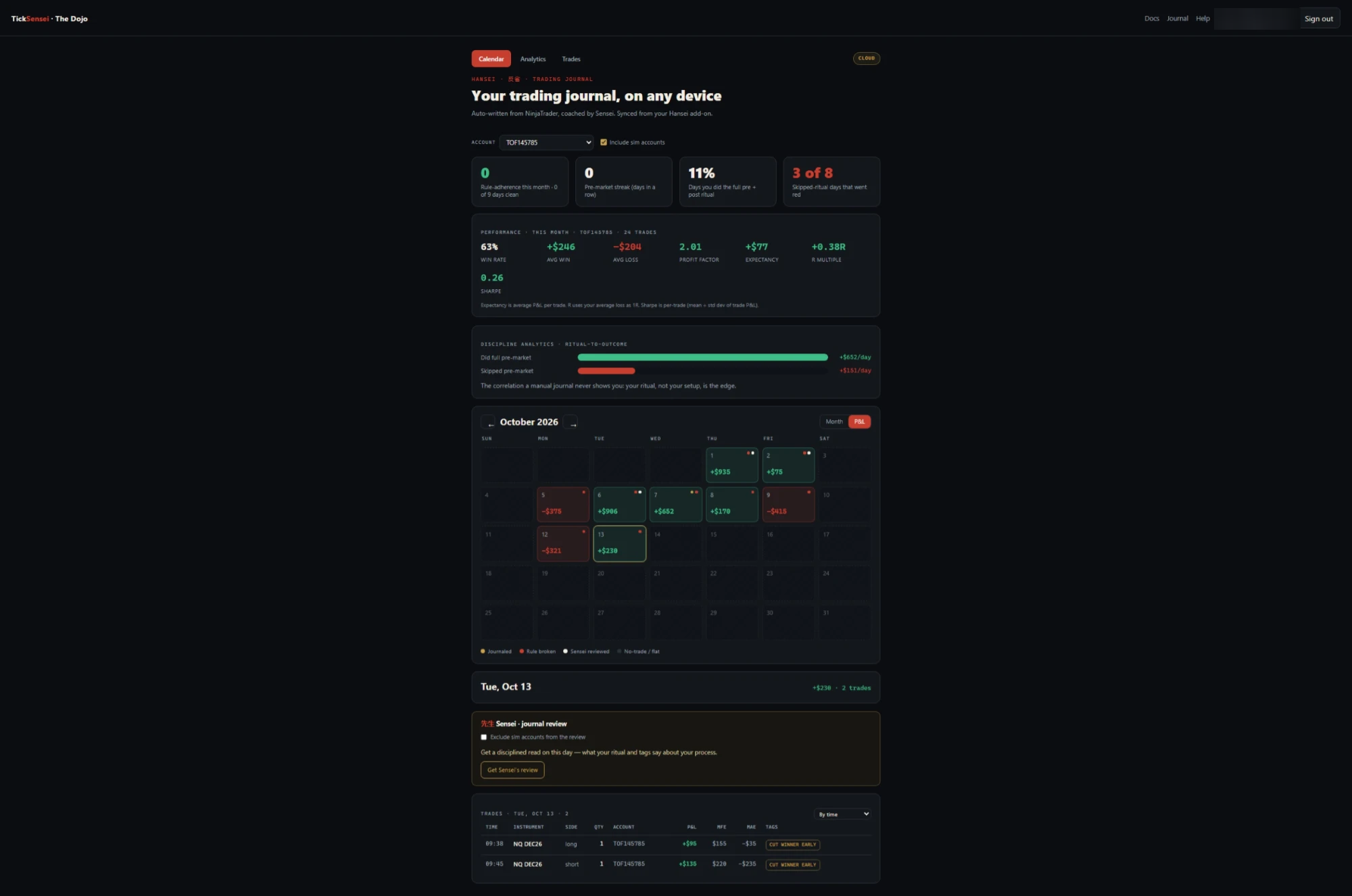 The Hansei Cloud web journal in the Dojo: discipline tiles, performance metrics, the ritual-to-outcome read (full pre-market vs skipped), a P&L calendar, and per-day trades with Sensei’s review - on any device.
- Cloud sync + a durable archive. Your journal survives a reinstall, a new PC, or a wiped NinjaTrader - it is backed up off the machine. Your free-text notes are encrypted (AES-GCM under a key-encrypting key) so even we cannot read them.
- Cross-device access + the Dojo web calendar. Review your discipline calendar and entries from any browser in the
#journalarea of your Dojo, not only the PC you trade on. - Sensei’s journal review. Sensei coaches against your real journal - the same session-review intelligence, now with your written intent and tags as context, so the feedback is about your patterns.
Start Hansei Cloud at ticksensei.com, or get it free as part of a Blue, Brown, or Black belt.
How Hansei fits with the rest
- Fudoshin enforces your risk limits - daily loss, drawdown, max trades. Hansei enforces your process - the pre-market work and the honest after-action. One stops the account from blowing up; the other stops the habits that get you there.
- Sensei reviews your sessions. With Hansei Cloud, that review is grounded in your actual journal rather than fills alone.
Recommended configuration
Starting out: build a short, honest checklist (3-5 items), leave enforcement off, and just let Hansei journal. Read the discipline analytics after a couple of weeks.
When you are ready to stop negotiating with yourself: turn on Block entries until cleared, set a readiness threshold with a no-trade day below it, and lock in your morning answers. Pair with Fudoshin’s tilt-proof for a process you cannot soften mid-session.
Troubleshooting
Hansei blocked my entry. The readiness gate is on and today’s check-in is not complete (or your readiness score is below your threshold). Finish the checklist, or relax the setting on Fine-tune → Enforcement & lockout. Exits are never blocked.
The journal is capturing trades but nothing syncs. Sync is a Hansei Cloud feature. The free local tier journals on-device only; start Hansei Cloud (or a Sensei belt) to enable sync, the web calendar, and the archive. On Cloud, confirm the Account email on Fine-tune matches your Dojo/subscription email.
Sim trades are cluttering my journal. Turn off Include simulator accounts under Capture & account, or use the Incl. sim toggle on Review to hide them from the recap.
I’m on a belt - do I need to buy Hansei separately? No. Blue, Brown, and Black belts include Hansei Cloud at no extra cost; your belt activates it automatically.
Sensei isn’t reviewing my days. Sensei’s journal review is a Cloud feature and uses your hosted-Sensei allowance (or a Brown/Black belt’s included hosted AI). On a BYOK Sensei (Blue belt), journal review runs on your own key.
Related
- Fudoshin - Risk Guardian: enforces your risk limits while Hansei enforces your process
- Sensei - AI Copilot: reviews your sessions, grounded in your journal with Hansei Cloud
- The Dojo: where your web journal calendar and account live
Estimates and tooling only. Your prop firm's published rules are always authoritative, and nothing here is financial advice. Questions? support@ticksensei.com